Description: Game Scouting is a method by which an owner can get more detailed information about how a team played a game. For a fee, a user can obtain breakdown information about everything from the sets a team played in a game to how often they passed various distances.
Topics:
How to Scout
Reading the Scouting Results
Play Distribution Type by Down
Passing
Rushing
Offensive Sets
Defensive Sets
Re-Scouting
Related Topics:
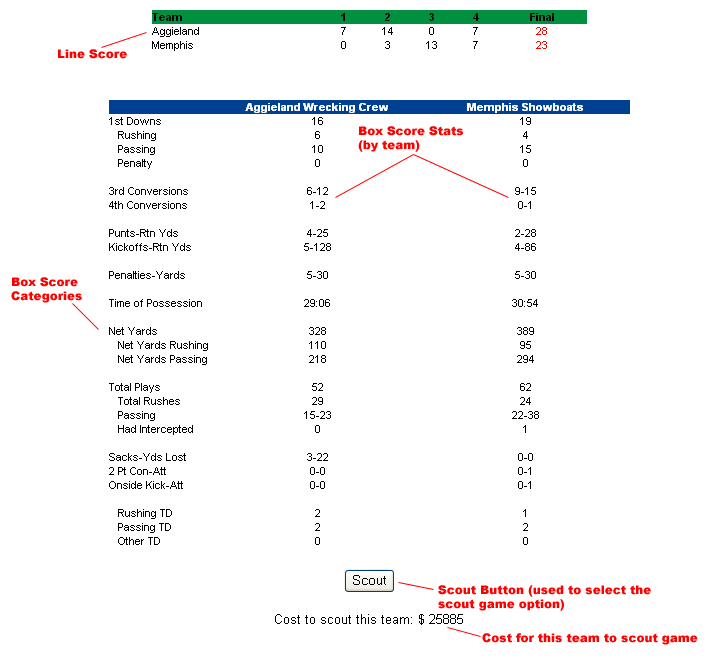
How to Scout: At the bottom of the box score page, there is a button labeled "Scout" and a price. The price is how much it will cost you (from your money or bank) to get the additional information about the game. This covers the time that you and your assistant coaches spend analyzing game data. Clicking on the button will display a popup box asking you if you really want to spend the money to scout the game. If you click on "Ok" the money will be deducted from your cash reserve first, and if you don't have enough there, the bank. If you don't have enough total money in both locations, the scouting will not take place. If you choose cancel from the popup window, you will be returned to the box score view and no scouting will take place (no money will be deducted either). [View Sample]
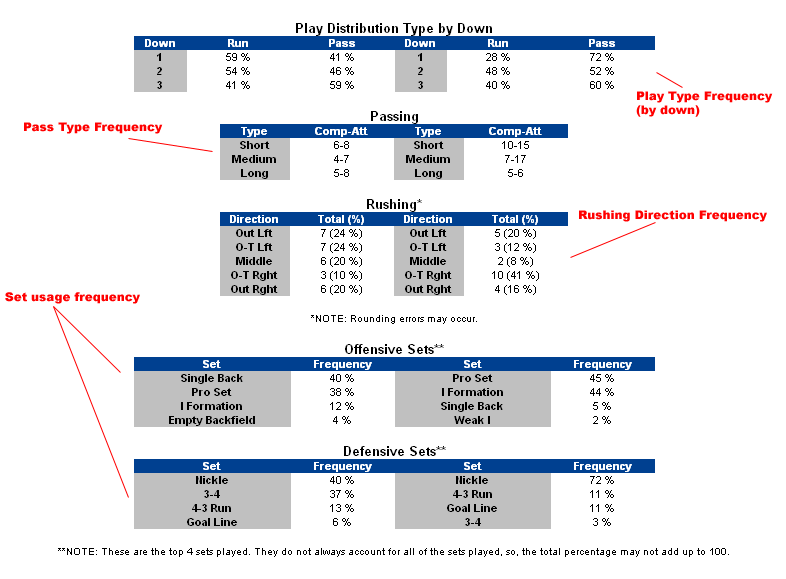
Reading the Scouting Results: The scouting results are consistent with the box score in that the home team's statistics are on the left and the away team's are on the right. All charts display the column headings in the blue field at the top of each table and the row headings in gray. [View Sample]
Play Distribution Type by Down: This is the first chart that appears under the box score when you scout the game. It reveals the percentages that a team passed vs. ran on particular downs. For example, if Down 1 for the Away team reads 60% - 40%, that means that on first down, the away team ran 60% of the time and passed 40%. Please remember that aside from first down, all downs are situational, meaning, it depends on the field position and how many yards to go for a first down. If a team is usually in 3rd and long situations, you may see a high number of passes.[View Sample]
Passing: This table displays the pass attempts and completions made by distance. [View Sample]
Rushing: The rushing table shows you how many runs were made in a certain direction and what percentage of all runs that comprised. So, "8 (24 %)" would say that 8 rushes were made in that direction, and that was 24 % of the total rushes made in the game by that team. Each of the rows corresponds to a sidelines section value that can be set by the owner.[View Sample]
Offensive Sets: Here you can identify what sets the team played on offense. The value shown is the percentage of plays that the team used the set. Please note that these are just the top 4 sets that were utilized. The percentages may not (and probably won't) total 100%. [View Sample]
Defensive Sets: Just like the Offensive Sets, this table shows what sets a team played on defense. Again, the percentages may not add up to 100%, and it is important to note that much like play distribution, defensive sets are dependent on the situation, so, if the opponent found themselves in a lot of third and long situations, the sets may be different than if that team had a lot of 3rd and short opportunities.[View Sample]
Re-Scouting: Once you scout a game the fact that you scouted it is not saved. If you want to obtain the information again and didn't print or save it, you will have to pay for the scouting again. In other words if you want to reference the information again, it is best to somehow save it.